What you need
- A TV with a Chromecast, Chromecast with Google TV, Google TV Streamer, or Chromecast built in (common on Sony, Philips, TCL and Hisense TVs).
- Your Mac and the TV on the same Wi-Fi network. Guest networks often won't work.
Macs don't come with a Cast button. AirPlay, which is built into macOS, only works with an Apple TV or a TV that supports AirPlay 2. If your TV has Google Cast instead, you need one of the routes below.
Four ways compared
| Method | Best for | Picture quality | Plays MKV, AVI |
|---|---|---|---|
| Cast a Chrome tab | Websites and online video | Depends on the site | Rarely |
| Mirror your screen | Slides, photos, a quick demo | Lower, can stutter | Only as a screen recording |
| HDMI cable | Anything, if the cable reaches | Full | Yes, in a player on the Mac |
| Casting app | Video files on your Mac | Full | Yes, with TellyDrop |
1. Cast a Chrome tab
Google Chrome on the Mac can send a browser tab to your Chromecast.
- Open Google Chrome and go to the page you want on the TV.
- Click the three-dot menu at the top right, then Cast, save and share › Cast.
- Pick your TV from the list.
Sites with their own Cast support, such as YouTube, hand the video over to the TV directly, and that looks good. For other pages Chrome sends a live copy of the tab, which is softer and can lag. For video files on your Mac, Chrome is a poor fit. It only plays a few formats, and it sends a copy of the tab rather than the file itself.
2. Mirror your whole screen
In the same Chrome Cast menu, open Sources and choose Cast screen. Everything on your Mac's display now appears on the TV.
That's handy for showing photos or a presentation. For a film it's the weakest choice. The Mac records its own screen and streams that recording, so you lose sharpness, the picture can stutter, sound often drifts out of sync, and every notification you get shows up on the TV.
3. Use an HDMI cable
A cable always works. Newer MacBook Pros have an HDMI port; a MacBook Air needs a USB-C to HDMI adapter. Plug it into the TV, pick that HDMI input, and play the video in QuickTime, IINA or VLC in full screen.
The catch is the cable itself. Your laptop sits next to the TV, you get up to pause, and the Mac's screen is busy for the length of the film.
4. Use a casting app
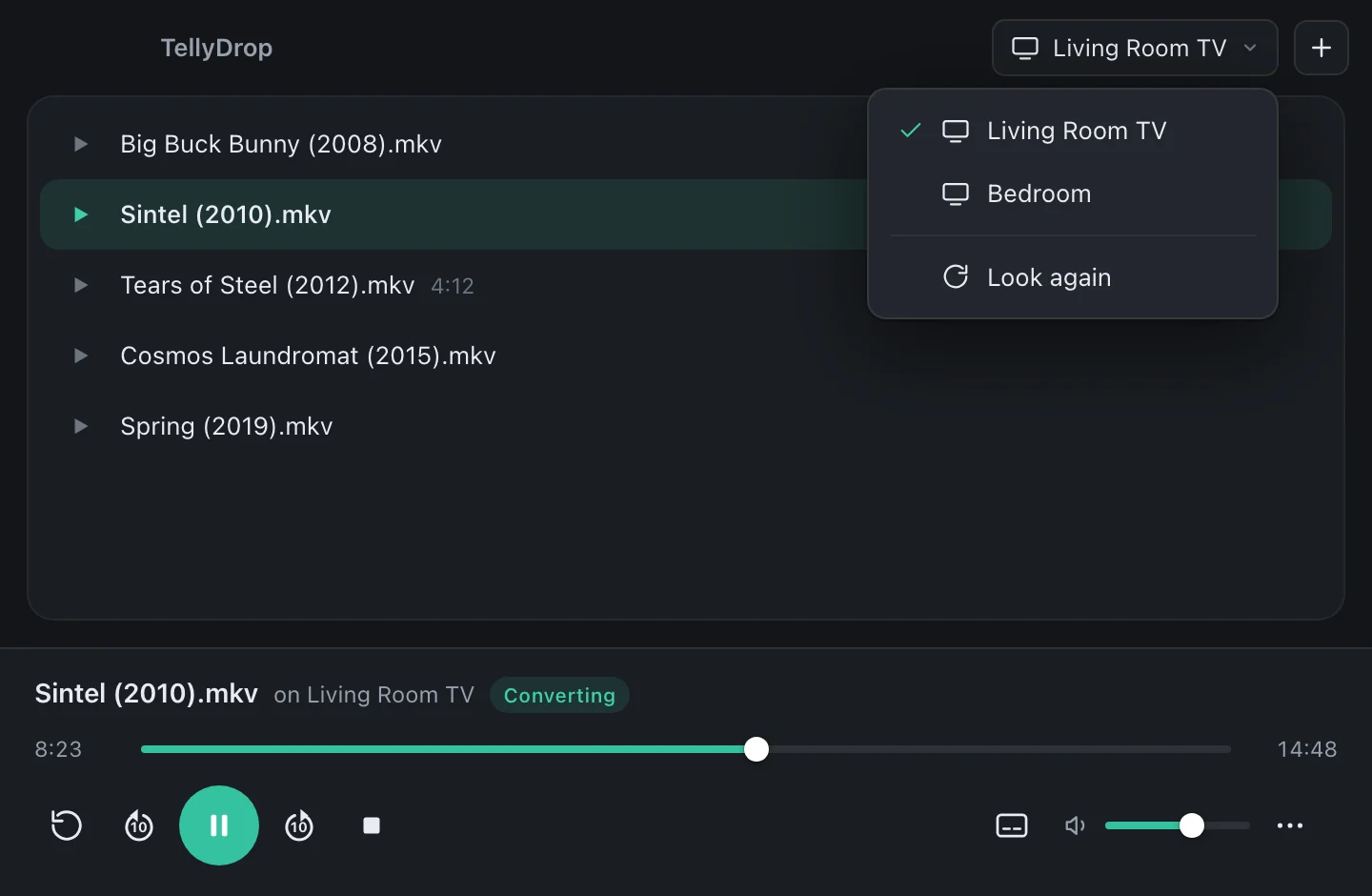
A casting app doesn't send a picture of your screen. It sends the video file itself, and the Chromecast plays it at full quality. Your Mac stays free for other things while the film plays.
The problem with plain casting is that a Chromecast only plays a small set of formats. That's why TellyDrop checks every file first and converts whatever the TV can't play, live, using the Mac's video hardware.
- Open TellyDrop and drag a video onto the window.
- Click the TV button at the top and pick your Chromecast or Google TV.
- The video starts on the TV. Pause, skip and change subtitles from the Mac.
TellyDrop: Chromecast for Mac
Plays MKV, AVI, DivX, MP4 and 20 more file types on your Chromecast or Google TV, with subtitles and surround sound. Free to try, €14.99 once to unlock.
See what it doesWhen your TV doesn't show up
- Same network. The Mac and the Chromecast must be on the same Wi-Fi. Some routers put the 2.4 GHz and 5 GHz bands on separate networks; connect both to the same one.
- Local Network permission. macOS asks if an app may look for devices on your network. If you clicked “Don't Allow”, turn it on in System Settings › Privacy & Security › Local Network.
- VPN. A VPN on your Mac can hide everything on your home network. Pause it, or allow local network access in the VPN's settings.
- Guest and hotel Wi-Fi. These often keep devices apart on purpose, and then casting can't work.
- Restart the Chromecast. Unplugging it for ten seconds fixes more than you'd expect.
Questions
Can I cast from a MacBook to a Chromecast without Chrome?
Yes. Safari and the Mac itself can't send video to a Chromecast, but a casting app like TellyDrop can, without Chrome installed.
Can I use AirPlay with a Chromecast?
No. AirPlay works with Apple TV and TVs that support AirPlay 2. A Chromecast or Google TV only understands Google Cast.
Why does my movie stutter when I cast my screen?
Screen casting films your whole screen and sends it as a live video stream. That costs quality and smoothness. Sending the file itself, as a casting app does, avoids it.